 ×
AZ SPECTRUM · FIELD MANUAL
ARRIFLEX 416
HD IVS →
HD-SDI 1080P
CONVERSION.
AZ Spectrum retrofit of the original Arriflex 416 Plus IVS. Adds a real HD-SDI 1080p output and keeps the two original SD analog outputs. On-set workflow revolves around three things: pick the right BNC, keep the shutter manual at 1/25 to avoid flicker, and remember the direct shortcuts (DZOOM, AWB, FREEZE) without entering the menu.
Sony sensor,
three video outputs.
The conversion replaces the 416 IVS internal electronics with a 2 MP Sony board. The original chassis and physical buttons are kept — all retain their labels — but the firmware and the connectors are new.
Sensor
Sony HD CMOS progressive. SDI formats: 1080P 60/50, 1080i 60/50, 1080P 30/25, 720P 60/50. EX-SDI formats: 135M, 135M+, 270M.
Analog
SD analog output in PAL or NTSC, or HD analog at 1080P 30/25 in AHD, TVI, or CVI (monitor-dependent). For a standard SD PAL/NTSC monitor: only CVBS works.
Power draw
Minimum illumination 0.1 lux at f/1.2 and 1080P 25. Internal sync. Color or B/W mode. Shutter and WB auto or manual. 10 AGC levels.
RIGHT, SDI.
LEFT, ANALOG.
The 416 Plus body with the IVS carries two front BNCs and two 4-pin Fischer connectors. Only one outputs HD; the others are analog SD or auxiliary power.
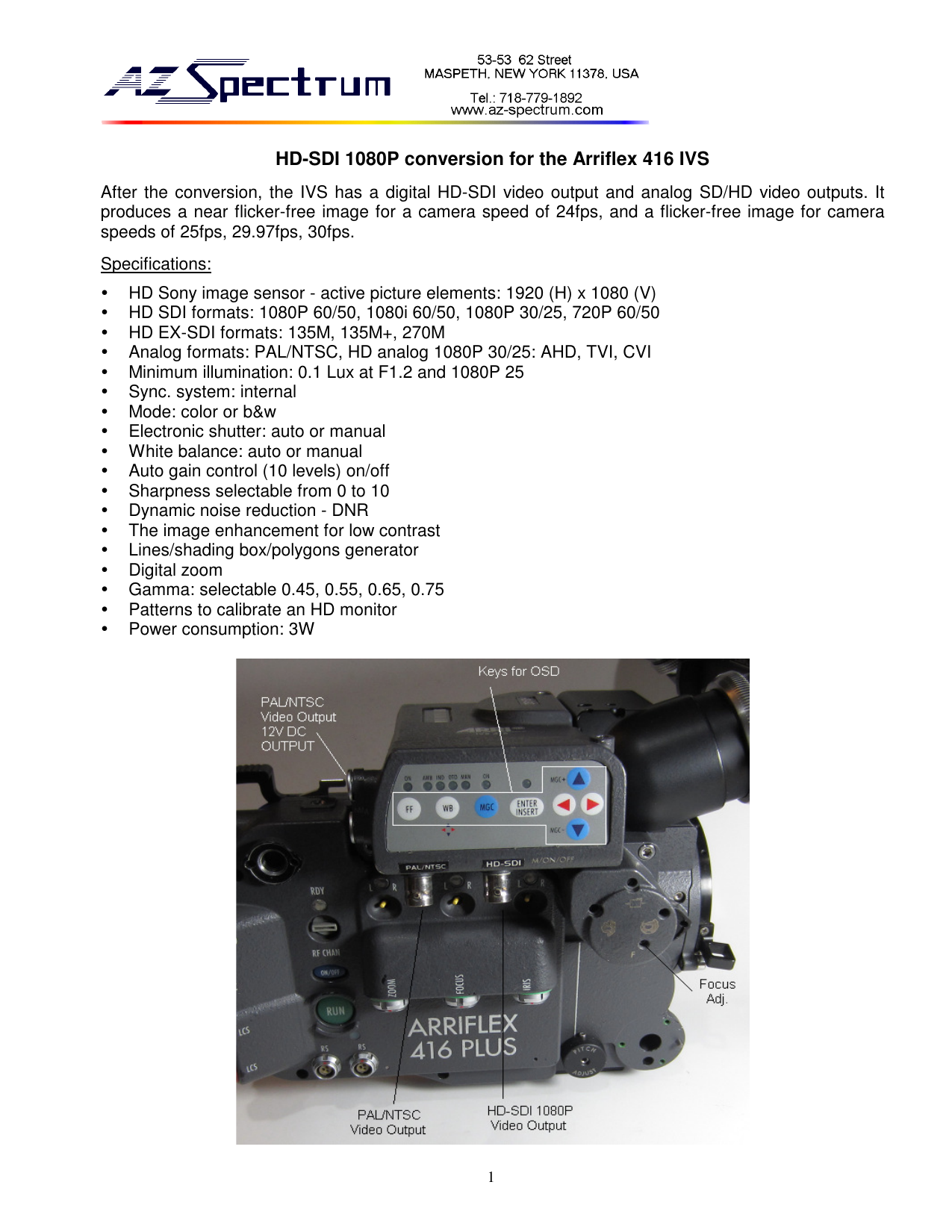
Video outputs
- Right BNC · HD-SDI
- Digital output. To HD monitor, wireless TX, or village capture.
- Left BNC · analog
- SD PAL/NTSC output, or HD analog (AHD/TVI/CVI) selectable under
SYSTEM → OUTPUT → ANALOG MODE. For standard SD monitor:CVBS. - Upper 4-pin Fischer
- Same SD analog signal (PAL/NTSC) for traditional ARRI viewfinder cables.
Auxiliary power
- Lower 4-pin Fischer
- 12 V DC output only. It is NOT a power input — the camera feeds the IVS internally. Use it for 12 V accessories (on-board monitor, tally light).
Classic first-day mistake: plugging a battery here trying to power the camera. Nothing serious thanks to protection, but you'll lose 10 min wondering why it won't turn on.
SDI cables — short ones first
Not every BNC cable works for SDI. An analog PAL/NTSC cable can seem to work on the bench and break at 10 m of run. If in doubt, use a short SDI reference cable to rule out the signal — then extend.
FOUR KEYS
+ FOUR ARROWS.
The 416 keeps the original panel's FF, WB, MGC, ENTER/INSERT keys and the ▲ ▼ ◀ ▶ arrows. Inside the OSD they're navigation; outside the menu, each key is a direct shortcut.
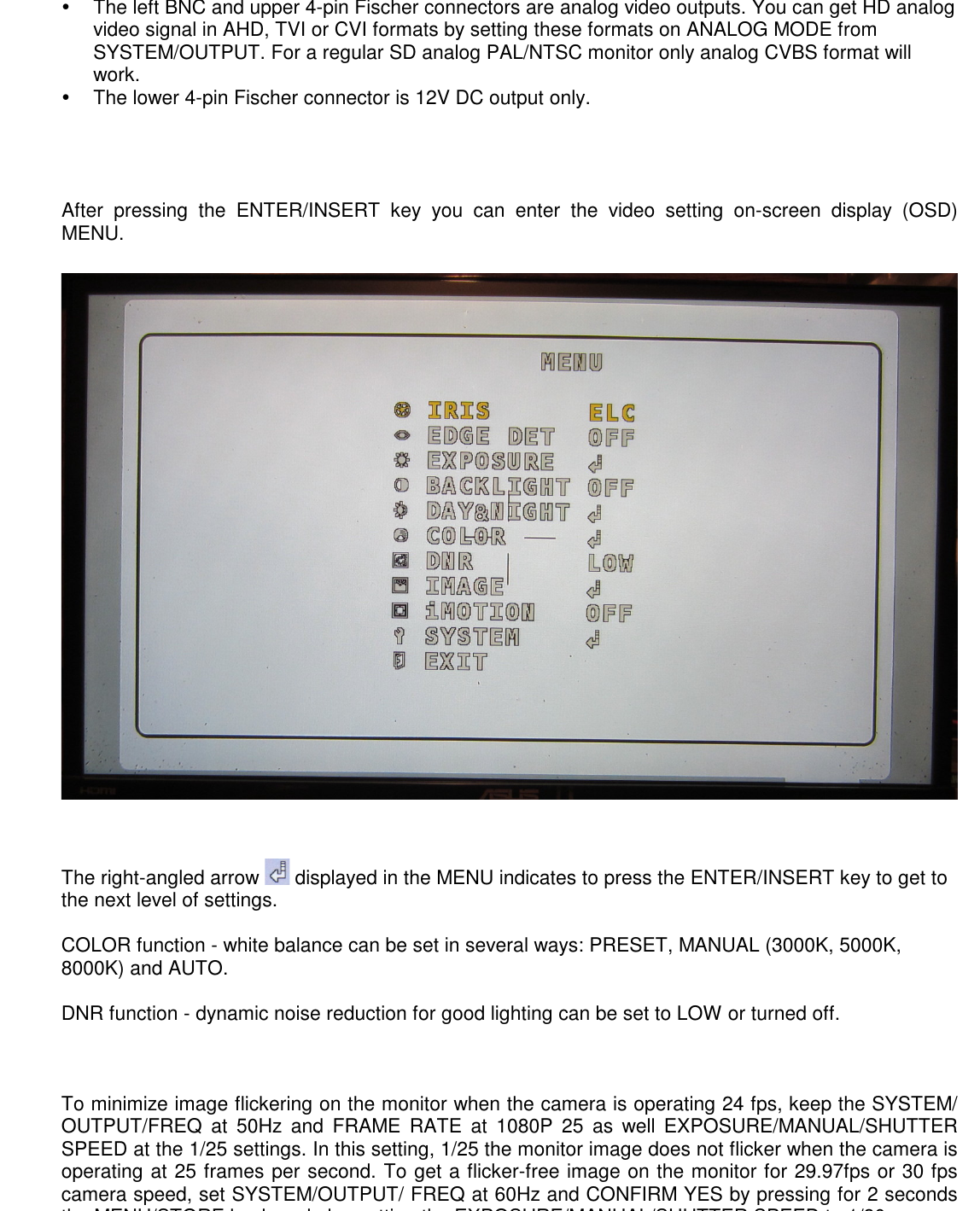
Enter the menu
Press ENTER/INSERT. The MENU screen with 10 entries appears. The ↵ arrow next to an item means another ENTER/INSERT opens its submenu.
- ▲ / ▼
- Navigate between items.
- ◀ / ▶
- Change the selected item's value.
- ENTER/INSERT
- Enter submenu or confirm.
Save and exit
Go down to EXIT, press ENTER/INSERT. Changes save via SAVE. Exit any other way and the settings are lost at next power-on.
The original FF key (Freeze Frame) keeps its shortcut role when the menu isn't visible — see section 10.
THE CRITICAL SETTING
IN THREE LINES.
The 416 runs at 24, 25, 29.97, or 30 fps. Each speed asks for a different combination of FREQ, FRAME RATE, and SHUTTER SPEED in the IVS so the monitor comes out flicker-free. These are the three lines that save you from an unusable take.
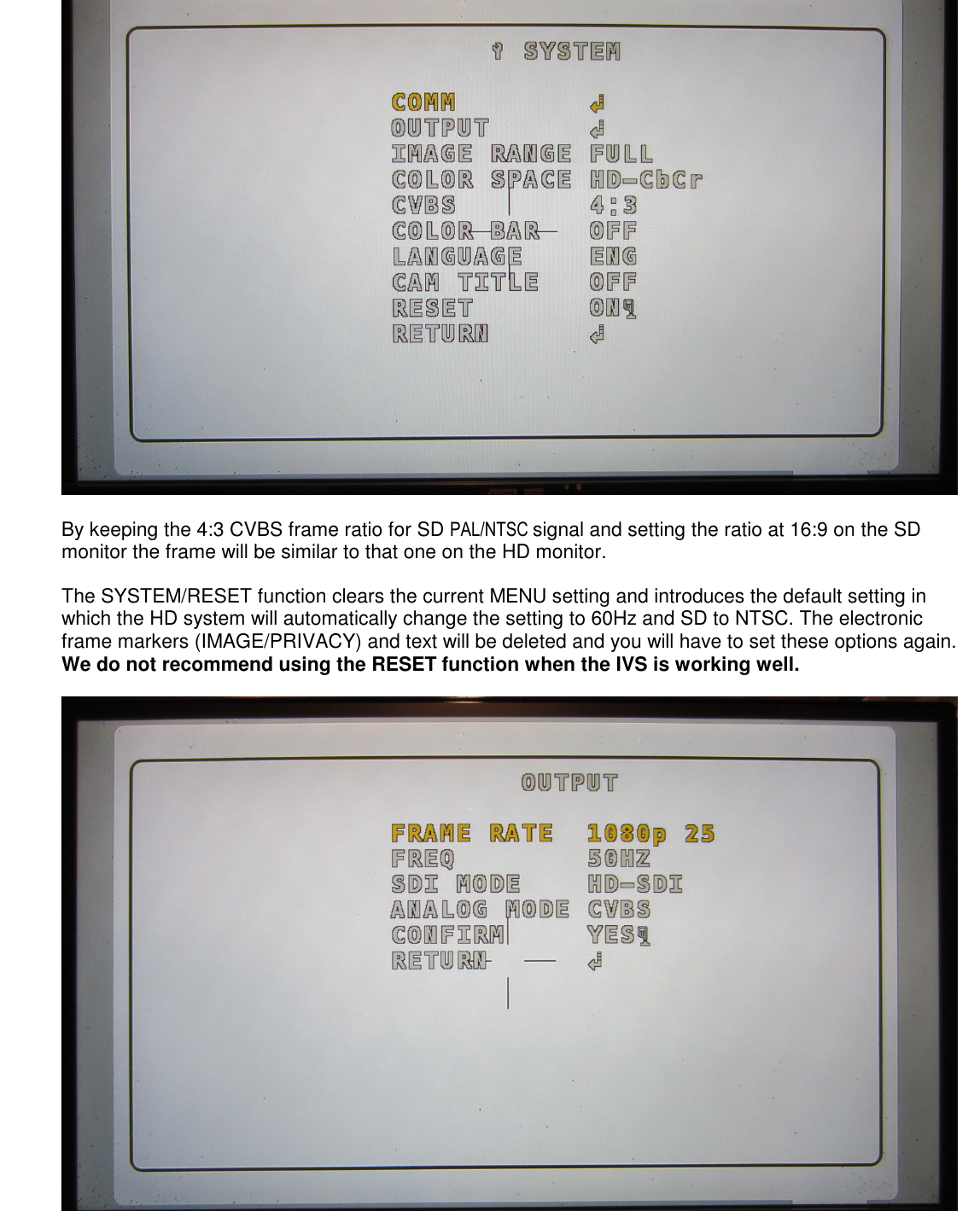
24 FPS · "25" configuration
- SYSTEM → OUTPUT → FREQ:
50 Hz - FRAME RATE:
1080P 25 - EXPOSURE → SHUTTER → MANUAL → SPEED:
1/25
At 24 fps, the 1/25 window overlaps enough with the mirror rhythm to stay nearly flicker-free. It's the default when the 416 runs cinema.
25 FPS · "25" configuration
- FREQ:
50 Hz - FRAME RATE:
1080P 25 - SHUTTER SPEED:
1/25
The cleanest scenario. The sensor runs at the same pace as the rotating mirror and flicker is gone.
29.97 or 30 FPS · "30" configuration
- FREQ:
60 Hz(and confirm withCONFIRM YESby holding MENU/STORE 2 s) - FRAME RATE:
1080P 30 - SHUTTER SPEED:
1/30
Changing from 50 Hz to 60 Hz in the OUTPUT submenu triggers a confirmation. Hold MENU/STORE (or ENTER/INSERT on this chassis) pressed for 2 seconds to apply. Without the confirmation, the change is discarded.
Don't use SYSTEM/RESET if the IVS is working well
The RESET in SYSTEM wipes the OSD: back to 60 Hz and SD NTSC by default, frame markers and privacy overlays gone. The manufacturer says it plainly: "We do not recommend using the RESET function when the IVS is working well". Use only as last resort.
Brightness, shutter, sens-up, AGC.
Inside the EXPOSURE submenu, SHUTTER is on MANUAL with SPEED locked to 1/25 or 1/30 (see section 05). The other three parameters are only touched when the scene asks.
Controls
- BRIGHTNESS
- 0-20. Default
10. - SHUTTER
MANUAL+1/25or1/30.- SENS-UP
- In very low light,
×2doubles exposure at the cost of motion blur. DefaultOFF. - AGC
- Max allowed gain (10 levels). Default
1.
Modes
- SHUTTER AUTO
- The shutter moves to compensate — produces flicker on the 416. Not for takes.
- SHUTTER MANUAL 1/25 or 1/30
- The only valid configuration (see section 05).
- SENS-UP × AUTO
- Combined with SHUTTER AUTO, for extreme night work — breaks mirror sync, use with care.
PRESET, MANUAL,
or AUTO with COLOR GAIN.
The COLOR submenu offers four AWB modes — PRESET, MANUAL (3000K / 5000K / 8000K), AUTO — and a COLOR GAIN from 0 to 20. For mixing tungsten interior and HMI exterior without touching the menu each time, AUTO is the most practical pick.
PRESET
Fixed white — locked in by pressing SET on a white reference card. Great if color temperature doesn't change. Doesn't follow variations.
MANUAL
Fixed temperature: 3000K, 5000K, or 8000K. For specific looks or as a fallback if AUTO drifts.
AUTO
Continuous tracking. Compatible with mixed tungsten + HMI within the same shot. Complemented by COLOR GAIN for saturation.
COLOR GAIN
0-20. Default 10. Useful when the DP wants more chromatic impact on the monitor without changing blue/red balance.
Sharpness, gamma, markers.
The IMAGE submenu groups 11 parameters, but only three get touched in production: SHARPNESS, D-ZOOM, and the PRIVACY masks.
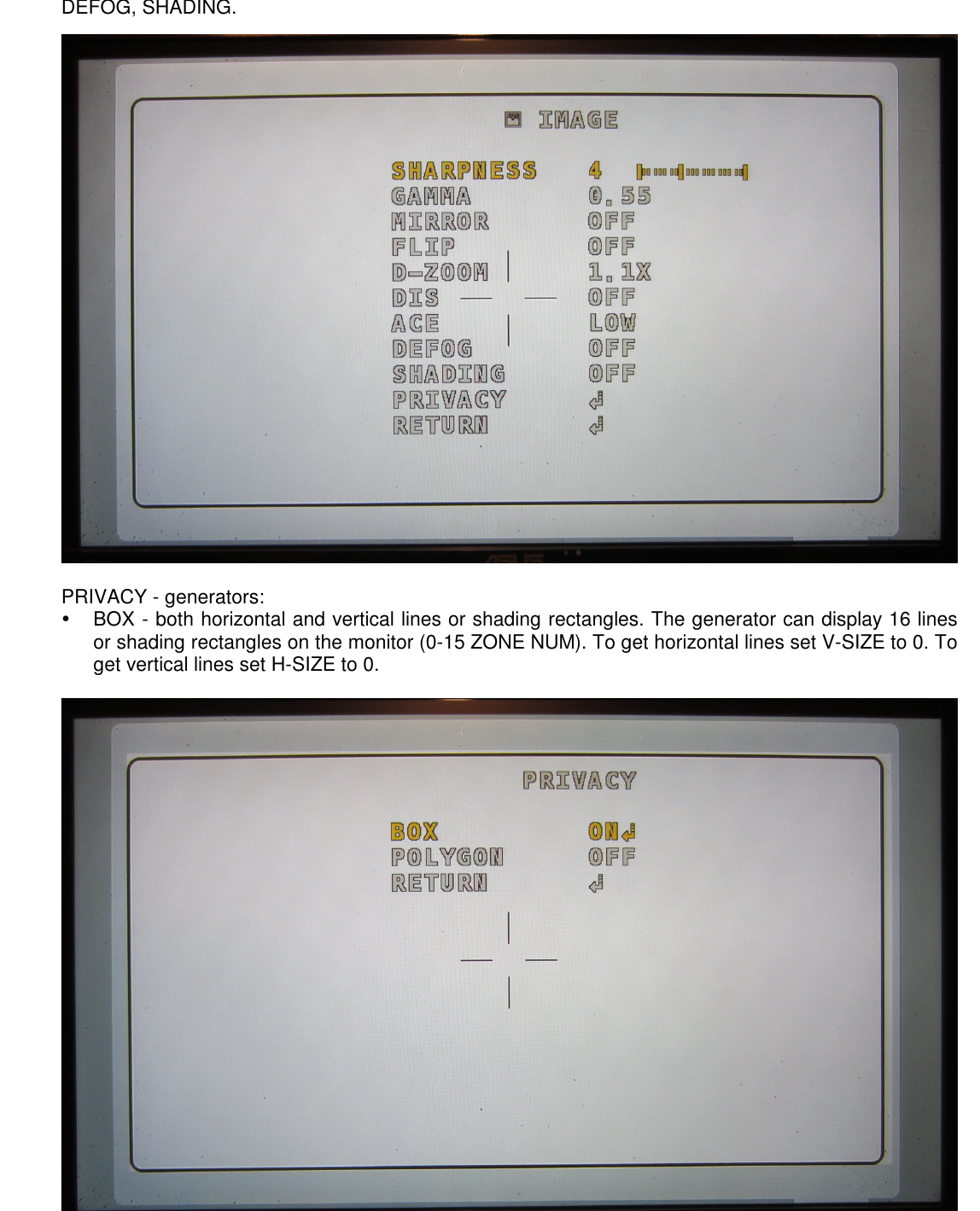
Standard processing
- SHARPNESS
- 0-10. Default
4. Above 6, the playback looks "artificial". - GAMMA
0.45,0.55,0.65,0.75. Default0.55.- MIRROR / FLIP
OFFby default. Useful if the IVS mounts inverted on a crane.- D-ZOOM
- Digital zoom in the IVS. Up to ×10. Also accessible as a shortcut (MENU/STORE knob — see section 10).
- DNR
- Dynamic noise reduction.
LOWby default.OFFif you want the monitor truer to the negative.
On-screen generators
- PRIVACY BOX
- Up to 16 rectangles with position, size, Y/CB/CR, and transparency. For horizontal lines set
V-SIZE 0; for vertical lines setH-SIZE 0. - PRIVACY POLYGON
- Up to 8 four-vertex polygons. Use POS0 (top-left), POS1 (top-right), POS2 (bottom-right), POS3 (bottom-left). Useful as a frame marker or as shading.
- ACE / DEFOG / SHADING
- Contrast and fall-off compensation.
OFFby default; only use with operator/DP present.
OUTPUT. Where flicker-free lives.
The SYSTEM submenu holds general config. Most stays at defaults; the only block routinely touched is OUTPUT — because that's where FREQ (50/60 Hz) and FRAME RATE live.
OUTPUT
- FRAME RATE
1080P 25or1080P 30(see section 05).- FREQ
50 Hzor60 Hz. Changing asks for confirmation (MENU/STORE 2 s).- SDI MODE
- Always
HD-SDI. The EX-SDI 135M / 135M+ / 270M options are for specific EX-SDI monitors — not used in LENSO flow. - ANALOG MODE
CVBSfor SD PAL/NTSC monitor. For HD analog (AHD/TVI/CVI) pick the mode your monitor accepts.
Rest of SYSTEM
- COMM
- RS-485. Only if an external control board is present.
- IMAGE RANGE
FULL. Don't change.- COLOR SPACE
HD-CbCr. Don't change.- CVBS
4:3default. Keeps the SD frame matching the HD at 16:9 on the monitor.- COLOR BAR
- SMPTE bars for monitor calibration.
OFFduring takes. - LANGUAGE
- English, Korean, Japanese, Chinese, German.
- CAM TITLE
- Up to 8 overlaid characters.
- RESET
- Factory reset — see warning in section 05.
Outside the menu,
the keys have another life.
When you haven't pressed ENTER/INSERT and the menu isn't showing, each panel key becomes an instant shortcut. Useful for quick tweaks during rehearsal without losing the monitor image.
▲ / WB
Short press — AWB: triggers a white re-balance against the current scene. Useful when changing from tungsten to HMI without touching the menu.
◀ / MGC
Short press — DZOOM−: zooms the digital zoom out (toward 1.0×). Save it for quick framing in tests; on takes, the optical zoom commands.
▶
Short press — DZOOM+: zooms the digital zoom in. Useful for checking focus on the monitor without moving the camera closer.
▼
Short press — FREEZE: freezes the image. Press again to unfreeze.
FF
Freeze Frame, identical to the one above. The manufacturer documents both paths because chassis labeling varies between batches.
ENTER / INSERT
Opens the MENU. If pressed with the menu already visible, enters the submenu or applies the change.
Fast on-set triage.
The 416 IVS's most common symptoms and their typical cause. The HD-SDI block and the accidental EX-SDI switch cover almost all the cases.
| Symptom | Probable cause | Fix |
|---|---|---|
| No image at power-on | Bad SDI cable, analog cable plugged in the SDI BNC, or empty battery. | Check cable and connections. Try a short SDI reference cable. Verify camera battery charge. |
| No image from the HD-SDI BNC | The IVS switched accidentally to EX-SDI. EX-SDI mode activates with three successive ◀ presses followed by ENTER/INSERT — happens in practice when someone fiddles with the buttons. |
Return to HD-SDI: power the IVS off and on. Press the ▶ arrow (BNC MODE) 3 times, then ENTER/INSERT. After 3 seconds it returns to HD-SDI. Or from the menu: SYSTEM → OUTPUT → SDI MODE → HD-SDI. |
| Continuous monitor flicker | FREQ, FRAME RATE, or SHUTTER SPEED don't match the camera speed. | Apply the combo from section 05 — make sure to confirm the FREQ change with MENU/STORE for 2 seconds. |
| Partial SDI image only | Internal sync error. | Power the IVS off and back on. |
| Image frozen at startup | The ▼ (FREEZE) key was left active. |
Press ▼ (DOWN) once to unfreeze. |
| No signal in analog BNC or viewfinder Fischer | SYSTEM → CVBS disabled. |
Check that SYSTEM → CVBS is set to 4:3 (or the matching ratio), not OFF. |
| Long SDI cable, no image | Length exceeds the cable's quality. | SDI fails "off the cliff": it works up to a length then drops everything. Use certified SDI cable or shorten the run. |
| Settings lost on power-off | Didn't go through EXIT → SAVE. |
Return to the menu and exit explicitly via EXIT. |
| Everything off after too much tweaking | Menu in inconsistent state. | Last resort: SYSTEM → RESET → ON. Reapply frame rate and overlays. Manufacturer advises against it if the IVS still works (see section 05). |